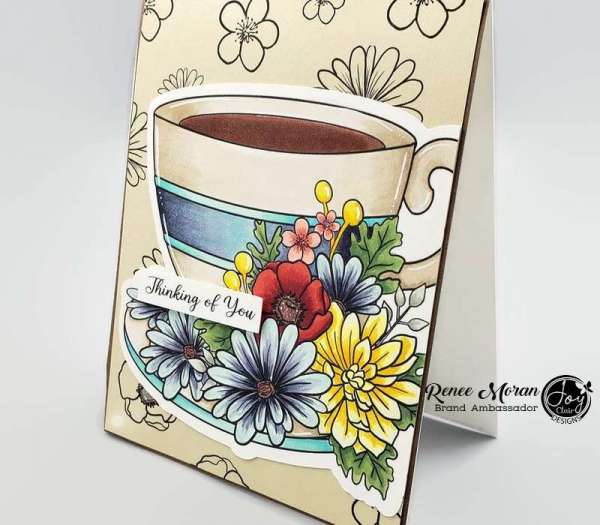
Renee used beautiful flower digital stamps from Joy Clair to create her own custom pattern paper for the background of her handmade card — and I absolutely love this technique.
If you’ve never tried making your own background using digital stamps, this is one of the easiest ways to elevate your cardmaking without buying new patterned paper every season. Instead of reaching for a pre-printed sheet, Renee simply repeated the floral digi stamp across her page to design a completely personalized background.
And here’s the best part — you can resize, rotate, and space the images however you like.
How to Create Custom Pattern Paper with Digital Stamps
Creating your own printable pattern paper for cardmaking is surprisingly simple.
Step 1: Open Your Flower Digital Stamp
Upload the floral digi stamp into:
- Microsoft Word
• Canva
• Photoshop
• Or any basic image editing program
Duplicate the image multiple times across the page.
Step 2: Adjust the Layout
Renee kept her florals evenly spaced for a soft repeating pattern, but you can also:
- Overlap images slightly for a fuller look
• Rotate them for a tossed floral effect
• Resize some larger and some smaller for depth
• Keep them tightly packed for bold statement backgrounds
This flexibility is one of the biggest advantages of using digital stamps for cardmaking.
Step 3: Print on Smooth Cardstock
Once the layout looks balanced, print onto smooth white cardstock. This gives you a seamless custom background that coordinates perfectly with your focal image.
Let the ink dry fully before coloring.
Coloring with Copic Markers
For her focal image, Renee used a large coffee cup digital stamp and colored it beautifully with Copic Markers. Alcohol markers are ideal for digi stamps because they blend smoothly on smooth cardstock.
She added depth and dimension with:
- Light-to-dark shading on the cup
• Soft shadowing under the handle
• Rich floral tones to complement the background
Because she designed the background herself, she was able to coordinate the color palette perfectly — something that’s much harder to achieve with store-bought patterned paper.
Why This Technique Works So Well
Designing your own digital stamp background gives you:
- Complete control over color schemes
• Unlimited resizing options
• The ability to match focal images exactly
• Budget-friendly crafting
• No bulky paper storage
It’s especially helpful if you:
- Don’t have matching patterned paper
• Want a one-of-a-kind card
• Love cohesive, coordinated designs
• Prefer minimalist stash building
Instead of hunting for “just the right paper,” you simply create it.
Creative Ways to Use Custom Digital Stamp Backgrounds
This technique isn’t limited to florals.
You can create your own pattern paper using:
- Sentiment stamps
• Seasonal images
• Small icons like hearts or stars
• Holiday motifs
• Leaves and botanical elements
Imagine repeating tiny coffee cups behind a larger focal cup, or creating a citrus background to match a summer drink image.
The possibilities are endless.
Why Digital Stamps Are Perfect for Custom Backgrounds
Rubber stamps can be used for background stamping, but digital stamps offer more control.
With digi stamps, you can:
- Perfectly align your images
• Avoid smudging
• Adjust spacing before printing
• Reprint if you make a mistake
It’s clean, simple, and beginner-friendly.
Renee’s card is such a lovely reminder that you don’t need an enormous paper stash to create something special. With just a few well-chosen digital stamps, some smooth cardstock, and a set of Copic markers, you can design completely custom card backgrounds that look polished and professional.
Sometimes the best craft supply isn’t something new — it’s using what you already have in a smarter way.
Visit the Joy Clair blog for a video tutorial.
-Heather
Looking for more digital stamps and SVG files? We love using the Design bundle to download our digital stamps. Make sure you check out their free section for free digital stamps. These free digital stamps and SVG files change all the time and you can grab some great seasonal stamps as well as everyday digital stamps and fonts that you can use.
Looking for more discussions about Card making? Check out our Facebook group for cardmaking.